TimerBar
A macOS menu bar timer with two modes and a coach that only talks when you are not working.
Apple silicon, macOS 11 or later. Free and open source under the MIT licence.
Two modes
Timer running
Pick five minutes to ninety from the menu, say what you are working on, and it counts down next to that label in the menu bar. It flashes at zero. No tips interrupt you while the clock runs.
Freebasing
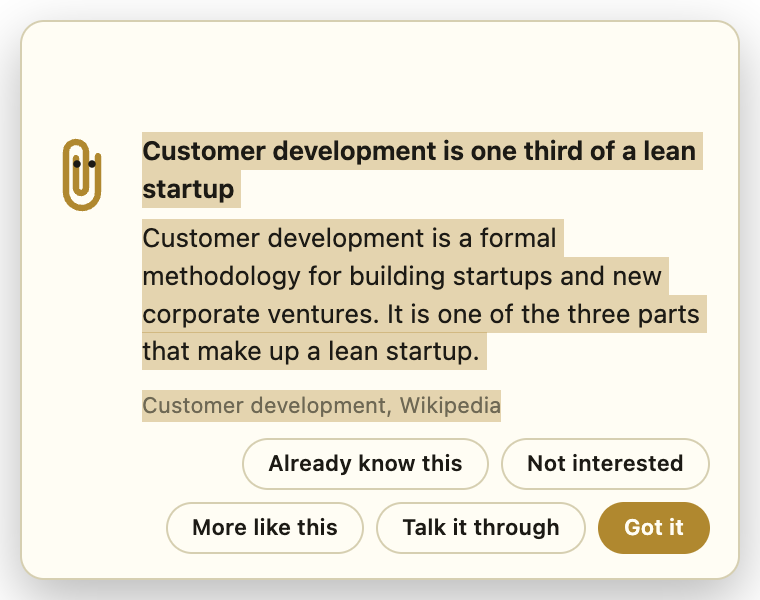
No timer and no goal you are held to. Every four to twelve minutes a card slides into the corner with one idea and stays above every window and every Space until you deal with it.
What the coach knows
366 cards distilled from free sources, a third each on building a SaaS, on the psychology of attention, motivation and habit, and on the psychiatry around working with your own head. Every card names its source and links back, so the provenance is checkable rather than invented.
- Talk it through opens a Claude Code session seeded with the card so you can argue with it.
- Already know this and Not interested retire a card for good. More like this keeps it in play and counts as a vote for more in that direction.
- Once a week a tune-up card reads what you have been working on, interviews you, and rewrites the personal cards around your situation.
- Quiz me… in the menu tests you on the cards you have seen, retires what you clearly know, and writes new cards around the gaps.
Power draw
On battery the menu bar shows the median draw over the last five minutes. Over 22 W a flame flashes in its place, and at places you have marked as having a charger within reach a card asks you to plug in.
Install
Download the dmg, drag TimerBar into Applications, and open it. The build is signed ad hoc rather than notarised, so macOS refuses the first launch. Open System Settings, Privacy & Security, and choose Open Anyway next to the TimerBar message, or clear the quarantine flag and launch again:
xattr -d com.apple.quarantine /Applications/TimerBar.appThe app lives in the menu bar and has no Dock icon. It offers to start at login once, on first run. The card that warns about a hidden timer needs Accessibility access, which is optional and asked for in the log rather than with a dialog.
How it was built
By prompting. The README keeps every prompt of the session that produced the app, verbatim and in order, with the count of lines a human wrote: none.